Affinity Photo Training Courses

Affinity Photo Training Courses with Greta Powell Training

Our Affinity Photo Training Courses run from introduction, advanced through to tailored Photo workshops which focus on content you need to cover. 

For example our Affinity Photo Course for beginners covers all the basic tools, features and techniques involved in photo manipulation such as resizing, cropping and transforming whilst on the Advanced Affinity Photo Course you’d look at masking, adjustments and image enhancement.

Short Affinity Photo Training Sessions – Bitesized

Have you got a specific problem in Affinity Photo? Unsharp mask not working properly, RAW files misbehaving, not sure how to correct colour, adjust light or add shading?

Get in touch with us to find out about our short Affinity Photo training sessions designed to help with specific problems.

Depending on the included content bitesized Training is available in both 2 hour sessions or half day training Affinity Photo workshops.

Online Affinity Photo Training Courses

Online Affinity Photo Courses run on most video conferencing software including Zoom, Teams and Google. These are available on a 24 /7 basis including weekends and evenings for all timezones.

Onsite Affinity Photo Training Courses

Onsite Affinity Photo Courses are hosted on your premises at times and dates to suit you and are delivered for one to one sessions or small groups.

Introduction to Affinity Photo Training Course

On an Introduction to Affinity Photo Course you learn the basics of the software, image tools and image enhancement for print and digital.

We cover a large range of tools, techniques and features including:

  • Affinity Personas /Photo and Develop
  • Affinity Tools /Crop, Transfer, Brushes
  • Selection Tools with Affinity Photo
  • Context Tool Bar / Tool Properties
  • Quick Masks
  • Layers and Adjustments
  • Sharpening Images 
  • Exporting for print and digital
 
Affinity Photo Introduction Training
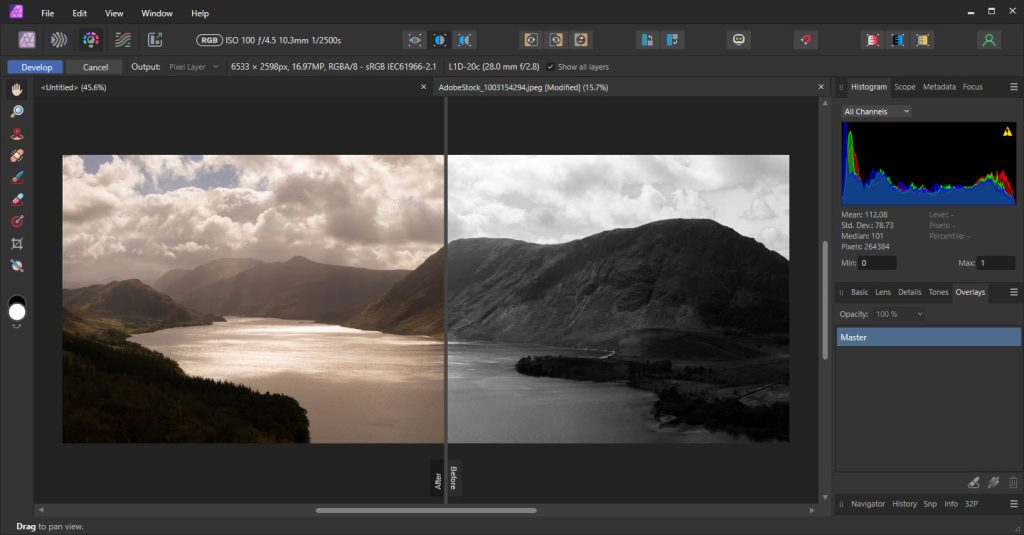
Split View in Affinity Photo with Before & After Edits

Advanced Affinity Photo Training Course

On an Advanced Affinity Photo Course you’d learn the to work with the more complex side of Photo including working with RAW files and understanding the importance of non-destructive workflows.

  • Advanced Selections & Masking, Refine selection edges, luminosity and nested masking
  • Advanced Retouching, Frequency separation, dodge & burn, clone and heal tools
  • Non-Destructive Workflow, Indepth adjustment layers, live filter layers
  • The RAW Workflow, Develop Persona, focus stacking, panorama stitching, tone mapping, enhancing images
  • Color Management & Grading, Lab color, LUTs, curves, advanced blend modes, soft proofing for print.
  • Layer FX & Compositing, Complex composites, advanced blending, displacement maps, perspective live filters
Affinity Photo Training in the Midlands
Affinity Photo Interface
Affinity Photo Reviews for Greta Powell Training
"I really enjoyed my short Affinity Photo session with Greta as it allowed me to focus in on the learning I needed. Greta created a nice relaxed environment and gave a great demonstration. She then encouraged me to learn by doing and have a go. This helped embed my learning. I have made a quick improvement in my skills, and overcome the frustration I was feeling without Greta's help." Simon Whalley, Professional Nature Photographer, The WilderClay Gallery
Affinity Photo Training FAQs

This is for anyone with no skills or little knowledge and is ideal for those would want to touch up or manipulate their photo’s for their own use or on a professional level.

It is extremely popular with small businesses, independent photographers and home users.

Because our Affinity Courses are flexible about the amount of delegates sitting on the course and the content itself these tend to take between one or two days.

One to one sessions are one day. 

Affinity Photo Introduction Course
  • Work with the Affinity Tools, Panels, Persona’s and Interface
  • Select Tools, 
  • Layers /Layer Masking
  • None Destructive Filters & Lighting Effects
  • Work Retouch Tools including Clone, Healing and Inpainting Brushes
  • Quick Masks /Quick Mask Adjustments
  • File Formats /Working with PSD (Photoshop files)
  • Export & Print 

Affinity Photo Advanced Course

  • Advanced Selections & Masking, Refine selection edges, luminosity and nested masking
  • Advanced Retouching, Frequency separation, dodge & burn, clone and heal tools
  • Non-Destructive Workflow, Indepth adjustment layers, live filter layers
  • The RAW Workflow, Develop Persona, focus stacking, panorama stitching, tone mapping, enhancing images
  • Color Management & Grading, Lab color, LUTs, curves, advanced blend modes, soft proofing for print.
  • Layer FX & Compositing, Complex composites, advanced blending, displacement maps, perspective live filters
 

Our Online Affinity Photo Training Course is held virtually with a live instructor and run in video conferencing software of your choice including Zoom, Teams, Google or WebEx. 

Throughout your Affinity training course you will have direct contact with your trainer via audio, video and screen sharing, everything is in real-time.

With live online courses you can learn from anywhere on the planet and speaking of planets one great big plus of an online Affinity Photo Course is to learn without travelling.

Saving both climate footprints, money and time.. Because you’re not travelling any where your climate footprint is less.

We are happy to record your training session for you to refer back to after the training.

All our digital design courses are now available online. 

Find out more about Online Training

This is onsite Affinity Photo training meaning dates and times are totally flexible and at your convenience.

We deliver onsite Affinity Courses UK wide including most cities and their surrounding areas including Leicester, Derby, Nottingham, Birmingham, Coventry, Lincoln, Chester, Liverpool, Stoke on Trent, Oxford, Northampton, Sheffield, Peterborough, Oxford, Worcester, Harrogate, Shropshire.

Contact us!

  • The training is focused entirely on your and your company requirements

  • No traveling involved for you or your team saving travel & expenses

  • Cheaper than traditional training

  • The approach is focused specifically on you and your specific needs

  • Prior to the training you chat with the trainer about the content and delegates

  • The Affinity Photo course is tailored to suit you /your team

  • Flexible dates & times to suit you

Just in case you didn’t notice earlier – did you know that …?

We offer 24 /7 training including evenings and weekends for our clients who keep odd hours and our international ones that pop in to learn with us.

We travel UK wide including all major towns and cities, Liverpool, Cheltenham, Nottingham, Worcester.

Popular Courses – Tailored Affinity Publisher and Affinity Photo Training

Affinity Publisher is also very popular and often purchased with the Affinity suite including Affinity Photo and Affinity Designer.

We run a tailored Affinity Publisher and Photo course combining the strength of Photo’s image editing capabilities and Publisher’s layout strength. 

Affinity Publisher is used for the creation and design of marketing materials, social media posts, newsletters, infographics and more

Introduction to Affinity Photo Training Course - Overviews

The Affinity Workspace

Tools

Workspace

Window Menu

View Menu

Destructive v None Destructive Workflows

New Setup /Print /Photo /Digital

Affinity Photo & Layers

New, Edit, Shuffle and Delete Layers

Layer Menu /Fill Layer /Pixel Layer / Live Mask Layer

Adjustment Layers

Levels Adjustment Layer

Brightness & Contrast Adjustment Layer

Adjustment Layers and non-destructive edits

Quick Masks

Creating a Quick Mask

Context Tool Bar Options

Selection Tool /Selection Tools Properties

Toggle Quick Mask in Context Bar

Add /Remove to Quick Mask

Save Selection as a Channel

Selection Tools

Marquee Tools

Freehand Selection Tool

Flood Selection Tool

Selection Brush Tool

Select Menu

Affinity Photo Brushes

New Brushes /Brush Tips

Brush Controls

Brush Colour Replacement Tool

> Hardness, Opacity & Blend

> Tolerance, Contiguous 

Brush Dialogue Box

Masks & Mask Layers

Creating /Editing a Mask

New Mask Layer

Foreground /Background Options

Edit Mask Layer Content

Add /Remove to Mask

Adjusting Opacity /Blends

Image Adjustments

Image Size /Resolution

Exposure

Contrast

Transform

Crop

Affinity Photo Colour Adjustment

Colour Panel

Swatches Panel

RGB /CMYK

Gradient /Fill Tools

Clipping Layers

Creating Shapes

Placing Images

Create a Clipping

Move /Edit Content

Image Sharpening

Unsharp Mask

>Radius, Factor, Tolerance

Selective Sharpening

Clone & Content Aware Tools

Inpainting Brush

Inpainting Fill Tool

Clone Stamp Tool

Frequency Separations

Import /Export Images

PSD Images

Other Formats

Print /Photo /Web

Advanced Affinity Photo Training Course - Overview

Develop Persona and RAW

  • Using the Develop Persona for full control of RAW workflow

  • Tone curves & advanced exposure correction

  • Colour Grading with HSL, LUTs & split toning

  • Sharpening & Noise Reduction

  • 32-bit RAW files & HDR pipelines

Advanced Retouching

  • Frequency separation (skin smoothing, texture & tone adjustments)

  • Dodge & burn techniques

  • Healing brush vs inpainting vs clone

  • Removing complex objects & background cleanup

  • Restoring old photos (scratches, fading, discoloration)

Advanced Selections

  • Advanced selection refinement

  • Layer masks vs vector masks

  • Blend ranges for precision masking

  • Compositing multiple images seamlessly (lighting & color matching)

  • Complex cut-outs

Creative Effects & Non-Destructive Edits

  • Live filter layers for flexible adjustments

  • Deep dive into Blend Mode

  • Lighting effects, bokeh, and depth simulations

  • Create cinematics & styled photo effects

Advanced Colour Management

  • Print Soft Proofs (ICC profiles, CMYK conversions)

  • Spot colours, Pantone libraries for brand consistency

  • Preparing images for large-format printing

  • Exporting for digital, print, and cross-platform publishing

  • Colour calibration & monitor workflows

Affinity Photo & Automation

  • Recording macros for workflow

  • Batch processing

  • Custom assets & brushes

  • Optimising workspace