Adobe Lightroom Training Courses in Lincolnshire
Our Adobe Lightroom Training Courses in Lincolnshire, Lincoln and the East Midlands are available onsite at your premises or virtually online.
Online Adobe Lightroom Training Courses
Online Lightroom training is available virtually with a live instructor via Zoom, Teams or Google.
Onsite Adobe Lightroom Training Courses
Training is delivered onsite at your premises at times to suit your schedule. Our onsite Lightroom Courses are hosted at your premises UK wide.
Introduction to Adobe Lightroom Training
This is an introduction to Lightroom course so ideal for anyone with little to no experience of the software looking to improve their image editing skills either for professional or personal use.
Tailored Adobe Lightroom Training
Prefer a more tailored approach to your Lightroom course?
Whether it’s focus stacking for landscape, macro, local adjustment masks or fine tuning for colour get in touch to discuss your preferred content.
What do you learn on Adobe Lightroom Courses in Lincolnshire?
- Download & Import Photos
- Catalogues & Collections
- Retouch & Enhance Photos
- The Lightroom Interface
- Masking and Selecting
- Quick Actions
- Adobe Lightroom Presets
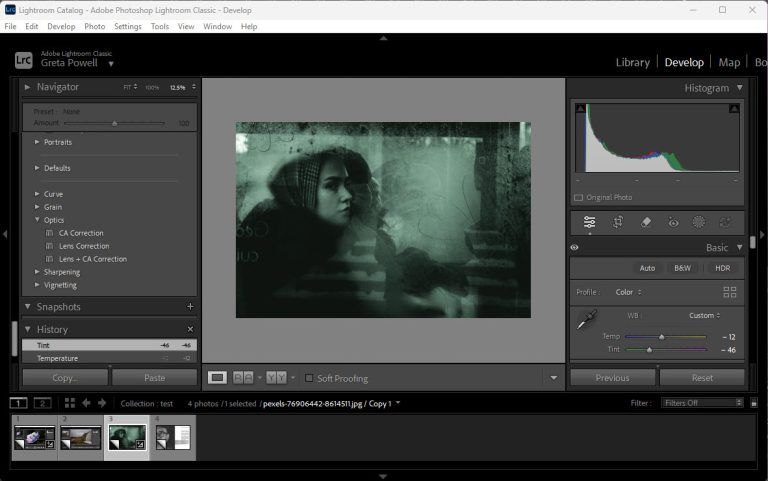
- Develop Tab
- Montage & Slideshow
- Create & Build a Photobook using Book Module
Review of Greta Powell's Lightroom Courses
Adobe Lightroom Workshop
This was a very good course.
I learnt all I needed and am confident using Lightroom now.
Photography Lecturer (Course Leader)
Extremely useful and a great learning opportunity where I learnt a huge amount of new tools and skills.
Photography Lecturer
An entertaining and very informative day that has given great insight into how Lightroom can be used.
Further practice will be needed but I now know the capability, flexibility and how effective Lightroom can be.
A very useful workshop.
Photography Lecturer and HNC Course Organiser
PHOTOGRAPHY & GRAPHICS DEPT, CITY COLLEGE, COVENTRY
Online Adobe Lightroom Training
Online Adobe Training via Zoom, Google, Teams, WebEX
Webinars and Pre-Recorded Video
24 /7 Online Adobe Lightroom Training
Online Courses are available 24 /7 inc overnight for international training & weekends
1 /2 Day Online Adobe Training Sessions
Learn better in small bite-sized chunks?
Online training days can be broken down into 1 /2 day slots
Bespoke Adobe Lightroom and Photoshop Training in Lincolnshire
Tailored Lightroom and Photoshop Courses
Both of these image editing tools are extremely powerful in their own right but together they take photography to another level.
About Lightroom
- Lightroom excels at organising & cataloguing making it ideal for professional photographers working with a large amount of photos.
- It’s extremely popular with photographers because it’s RAW based so super popular for Camera RAW editing.
- Shoot and edit using the Cloud based version. Work with your tablet, edit on the desktop then easy tweak on the phone.
- Easy export settings
About Photoshop
- Photoshop is layer based and gives greater control over more detailed image editing especially for retouching, cloning and more complex editing tasks.
- You can use Lightroom to add text to photo’s by adapting the watermark feature but Photoshop gives you access to way more powerful text editing tools.
- Check out our Adobe Photoshop for Photographers Course
Bespoke Adobe Lightroom and Photoshop Training in Lincolnshire
How do Adobe Lightroom Training Courses in Lincolnshire work?
Once your Adobe Lightroom Training is booked we arrange a pre-course chat /meeting to discuss the contents and logistics of the training course.
The trainer comes directly out to your premises to deliver the course
Flexible dates and times to suit your schedule
The course can be delivered as a one to one session or for company groups
Find out more about how Greta Powell Training’s Onsite Adobe Training Courses work
How does Online Adobe Lightroom Training Work?
Our Online Adobe Lightroom Training Courses are delivered virtually to you at a time and date to suit your diary.
All of our virtual Photo Editing training runs with a live instructor who you can interact with throughout your course via video, chat and sharing screens in real time. All our digital design courses are available online.
Do you record the online training sessions?
We do but can only offer this for one to one sessions and closed company groups.
What do you learn on an Adobe Lightroom Training Course?
We run onsite Lightroom Training in Lincoln, Lincolnshire and across the East Midlands
Your course is hosted onsite at your premises as face to face training at times and dates that suit you.
Although this course focuses on the enhancement of digital photography it also takes an in-depth look at the organisation of your photo files.
Because of the sheer amount of photographs gathered over time one of the features and techniques we look at in depth is working with catalogues and libraries.
- Library – learn to view, filter, organise, rate and compare the photo’s contained in collections.
- Develop – use Develops tools and features to edit and enhance your photography including Colour, Tone, Highlight /Shadow, Clarity /Vibrance /Saturation Control, Hue Saturation and Light, Image Exposure & Contrast, Clone Tools
- Slideshow, Print, Book & Web – these work at getting images out from Lightroom for output to screen and /or print
Lightroom is the chosen tool of photographers and you will learn how to work in a Non-Destructive workflow, understand and utilise its image editing tools including exposure, colour and contrast as well as repairing images with cloning and spot removal.
Being a suitable for beginners Lightroom course the entire workflow from camera to computer is covered including importing and editing in the RAW format.
24 /7 and Weekend Adobe Lightroom Training Courses
Because of the flexibility that virtual training provides our Online Lightroom Courses are available on any time zone so we can offer 24 hour availability including weekends.
We run our online training sessions via the most popular video conferencing software including Zoom, Teams, Google and WebEx. It’s your choice which one you prefer.
We are happy to record your training session for you to refer back to after the training.
How long do Adobe Lightroom Training Courses take?
Depending on the Lightroom Course content it takes between one and two days depending on the amount of people sitting on the training.
For one person a day usually suffices but for small groups of between 4 and 6 people two days is more realistic.
Adobe Lightroom training tends to be popular with individuals and we’re happy to run this as a 121 session or small group basis on either Saturdays or Sundays. Please get in touch to discuss the available options.
What other Photo Editing Courses do you run?
We deliver training in both Affinity Photo and Adobe Photoshop at all levels from introduction through to advanced.
Introduction to Photoshop Training
How to Book an Adobe Lightroom Training Course?
Booking with us
Please get in touch with us via the online booking form.
We will then get in touch and send the details of booking reservation and find out your timeframe for training.
We will then send across dates.
Once the booking is confirmed we then organise a pre-course call /meeting to discuss the course and any logistics around the day.
Payment
Payment for training is via BACS or Credit Card
Credit Card payment is via Stripe
*Greta Powell Training Ltd does not collect or store your card details.
Purchase Orders
We accept purchase orders from UK registered companies and the public sector.
Adobe Lightroom Training Course Content
Workspace Mode
Using the Workspace Layout
Left and Right Panels
Display Area
Catalogues & Collections
Setting up & Understanding Catalogues
Single /Mulitiple Catalogues
Collections /Quick Collections
Adding /Removing /Saving
Lightroom and Presets
Working with & Understanding Presets
Use Existing Presets
Design New Presets
Importing Presets
Preset Benefits
Book Tab
Create Photo Book Layout
Setting up Photo-Book Size
Auto Layout and Page Numbers
Guides and Bleed
Type and Background
Send to Blurb, JPEG or PDF
Exporting for Print on Demand Options
Lightroom Tools
Library and Navigation
Importing Photos and Files
Library Filters
Switch Views and Flag Photoshops
Working with the Filmstrip
Develop Module
Adjustments & None Destructive Working
Global Adjustments /White Balance /Exposure /Contrast
Local Adjustments /Specific Areas /Brushes /Filters
Histogram
Left & Right Panels
Develop Module Panel Tools
Edit Tool
Crop Overlay /Crop and Sharpen Tools
Remove /Heal /Clone Tools
Red Eye Correction Tool
Masking Tool
AI /AI Edits Tool
Photographic Slideshow
Slideshow Tab
Slideshow Setup
Slideshow Templates and Customisation
Playback and Playback Settings
Web Module
Create a Web Gallery
Collections and Web Gallery
Appearance
Output Settings
Colour Palette
Site Info
User Info
More about Lightroom Catalogs
Create & Manage a Lightroom Catalog
What is a Lightroom Catalog?
Importing /Exporting Images
Managing Catalog Images
Exporting Individual / Sets of Images
Lightroom Metadata
Keywords
Keywords in Sets
Keyword Syncing
Filters
View Meta for Target
Customise Metadata Panel
Metadata Syncing
