
Adobe Photoshop Training at all levels in Chester
Whether you’re a beginner, intermediate, or advanced user find the right Photoshop course for your skills. Learn essential workflows, master creative effects, and explore AI-powered tools to create professional graphics faster.
Beginner Courses, Learn the fundamentals and build confidence – View Beginner Course
Social Media Courses, Eye-catching graphics for Insta, Facebook, TikTok – View Social Media Course
Photoshop Training Courses from beginner to advanced
We run comprehensive Adobe Photoshop training courses in Chester for all skill levels. Whether you’re just starting out, looking to improve your workflow or aiming to master advanced creative techniques, you’ll find a course that fits your needs.
Our courses cover everything from the fundamentals of image editing to advanced compositing, automation and AI-powered Photoshop tools.
Use this page to explore our beginner, intermediate, advanced and social media-focused Photoshop courses which have been designed to help you create professional quality graphics efficiently and confidently.
Bespoke, Tailored Adobe Photoshop Courses
Our tailored Photoshop training is designed to meet your specific needs, whether you’re a beginner, intermediate, or advanced user. Each course is customised around your skill level, projects, and goals, covering everything from traditional workflows to AI-powered tools, so you gain practical, hands-on experience that you can apply immediately.
Bespoke Photoshop Courses are available onsite and virtually online
Why choose virtual online Adobe Photoshop Training Courses?
Custom Adobe training sessions that focus on your exact needs, ensuring training time is efficient, relevant, and immediately applicable in the workplace or at home.
Hands-On & Practical with a focus on real world tasks, so you leave not just knowing software features, but able to use them confidently in their day to day work.
Online Photoshop courses training are live instructor led and available at flexible times and dates to suit you, overnight, weekend with short Photoshop learning sessions that break the training into more managable bite sizes.
Our Adobe Photoshop Courses
Greta Powell Training Verified 5* reviews
Adobe Photoshop Workshop Review
Thanks very much for last weeks session. The group got a lot out of it and I’m sure will be using what you’ve taught them for a very long time.
It was lovely to meet you and I’m sure we’ll be in touch in the future for more sessions.
Sam, Talent Co-Ordinator, thinkBIGGA, Channel Four
Why use Greta Powell Training for your Photoshop Course?
- We offer hands on, practical training either onsite at your premises or with virtual online Photoshop Training sessions.
- Tailored Photoshop courses let you focus on skills you’ll actually use
- Hands on learning with projects and exercises
- Our courses cover the latest features and workflows including AI and generic software updated tools
- Super flexible dates and times – for online Photoshop Courses we can offer overnight and weekends
Tailored Adobe Photoshop Course with AI
Adobe Photoshop’s AI-powered tools, including Adobe Firefly and Google AI features, make image editing faster, smarter, and more creative.
Automate repetitive tasks like background removal, object selection, or color correction while exploring capabilities such as content-aware edits, design variations, or upscaling low-resolution images. Whether you’re creating social media graphics, marketing visuals, or professional design projects AI helps you save time, maintain quality, and unlock new creative possibilities all while adapting to your skill level and workflow.
Bespoke, Tailored Adobe Photoshop Courses
Adobe Firefly & Google AI Tools – Leverage cutting-edge AI to enhance your creative workflow
Background Removal & Object Selection – Automate tedious tasks in seconds
Content-Aware Edits – Replace or remove objects seamlessly
Design Variations – Generate multiple creative options quickly
Upscaling & Image Enhancement – Improve low-resolution images instantly
Color & Style Automation – Apply consistent adjustments across projects
Adobe Photoshop and AI Training FAQ
How do Online Adobe Photoshop Training Courses work?

All of our virtual Photoshop training runs with a live instructor who you interact with throughout your course via video, chat and sharing screens in real time.
24 /7 Training
Our courses are available 24 /7 including evenings, overnight and during weekends.
Do you record the courses?
Yes we do but unfortunately due to privacy issues we can only offer this for one to one sessions or company groups.
Half Day Training Blocks
We know for some people that full days of intensive training can be a bit much. Because of the flexibility of online training sessions full day courses can be broken down into two 1 /2 blocks.
How do Onsite Adobe Photoshop Courses work?
We come directly out to you onsite in Chester to deliver your training course at a time and date to suit you.
This is an introduction to Adobe Photoshop Training Course so ideal for beginners or those with a little experience.
We always organise an online meeting /voice call prior to the training to ensure you get the exact content and course delivery you want.
There are a wide range of face to face Adobe Training Courses in Chester and across the region, the North West and the Midlands. We’re happy to visit wherever you’re located.
Our courses are ideal for either 121 sessions or company groups looking for a more private and custom approach to their Photoshop training event.
There are a wide range of courses to choose from including our Introduction to Advanced ones but our tailored Photoshop courses are always extremely popular.
Who is the Adobe Photoshop Training for?

It’s ideal with anyone who needs to use Photoshop for minor edits in their daily workflow which could be resizing, cropping, slight tweaks and colour pops and also with anyone with more complex needs such as designing social media ads, flyers etc.
It’s very popular with content creators, photographers and particularly popular with small businesses needing to design professional and creative imagery for print or social media.
Our training is delivered to company groups, company rollouts or individuals. We can also arrange Photoshop webinars and recorded video tutorials.
What other Adobe Photoshop Training in Chester do you run
We run a number of different Photoshop Courses but the ones similiar to the Quickstart are:
Photoshop for Social Media Graphics
Do you run Adobe Courses at the weekends?
Our online Photoshop Courses are available on any time zone so we can offer 24 hour availability including evenings, overnight and during weekends.
We run our online Adobe training sessions via the most popular video conferencing software including Zoom, Teams, Google and WebEX.
1 /2 Day Adobe Photoshop Training Blocks
*We realise not everyone is keen on full days of training which is why for online courses we can break full days down into half days. So for example you could opt for two full days to be broken down into four half days taken over an agreed time period.
*Unfortunately we can only offer 1 /2 day availability for Online Training Sessions
What do you learn on this Photoshop Course?
On this Quickstart to Photoshop Course you will learn how to retouch, recolour and repair your photographs and learn the techniques needed to produce professional images for both business and personal objectives.
This course will go as far in depth as you need but as a general rule of thumb you will learn how Photoshop works and how to work with a variety of its features.
You will come away with a firm understanding of Photoshop Tools & Techniques and be able to create and enhance images for both print brochures, magazines and social media channels.
We will organise an online meeting prior to the course to firm up the content before the training.
- Work with Photoshop Tools, Panels & Interface
- Work with & understand Layers
- Work with AI Tools, Neural Filters /Generative Fill /Generative Prompts
- Selection Tools /Select & Mask
- Work with Colour and Colour Correction
- Colour, Gradients & Swatches Panels
- Crop & Transform Tools
- Selecting Faces & Hair in Headshots
- Learn to prepare images for both print and digital output
What are the benefits of Onsite Adobe Photoshop Training in Chester?
Training is focused entirely on you and your company requirements and is held onsite at your premises saving you /your team travel time and expenses.
Our Onsite Adobe Training Courses are focused totally around you and your specific needs, these aren’t a generic one size fits all course.
As well as Chester what other areas do you deliver onsite Photoshop Courses?
Our onsite Photoshop courses are run UK wide including all major cities and their surrounding regions. Rutland, Lincoln, Cheshire, Birmingham, London, Grantham, Sheffield, Cheltenham , Blackpool, Liverpool, The Wirral, Northampton, Peterborough, Milton Keynes.
What other Adobe Training Courses do you run?
We run a wide of design training courses, some of the most popular at the moment are:
- Adobe Premiere Rush for Mobile Video Editing
- Adobe Photoshop AI Training
- Adobe MasterClass Training
- Adobe CC Express Training
- Adobe Photoshop Introduction Training
- Adobe Photoshop Intermediate Training
- Adobe Photoshop Social Media Graphics Training
- Adobe InDesign Introduction Training
- Adobe InDesign Intermediate Training
How to Book Adobe Photoshop Training in Chester.
Booking with us
Please get in touch with us via the online booking form.
We will then get in touch and send the details of booking reservation and find out your timeframe for training.
We will then send across dates.
Once the booking is confirmed we then organise a pre-course call /meeting to discuss the course and any logistics around the day.
Payment
Payment for training is via BACS or Credit Card
Credit Card payment is via Stripe
*Greta Powell Training Ltd does not collect or store your card details.
Purchase Orders
We accept purchase orders from UK registered companies and the public sector.
Adobe Photoshop Training in Chester and Cheshire
Photoshop Getting started
Photoshop Interface
None Destructive Workflow
Control Bar
Photoshop Panels
Photoshop Techniques
Photoshop & AI
Working with Neural Filters
Skin Smoothing
Sky Replacement
Super Zoom
Colourise
Generative Fill /Generative Prompts
Photoshop Colour & Swatches
Colour models, RGB, CMYK & Pantones
Create /Edit Colours
Add /Edit Swatches
Add /Edit Colour to CC Libraries
Accurate colour for print
Working with Layers
Creating, Editing Layers
Layer Stack
Merging & Flattening Layers
Layer Palette
Fill Layers
Adjustment Layers
Photoshop Practicalities
Working with Multiple Images
Understand different Image Modes
Photoshop Keystrokes
Working with Views
Window >Arrange Window >Workspace
Image Formats
Photoshop Colour
Colour Harmony
Colour Replacement
Hue & Saturation
Colour Balance
Photoshop Selections
Lasso, Magnetic Lasso, Wand
Feathering Selections
Adding to /Removing From
Quick Selection Tool
Select & Mask
Save / Load a Selection
Photoshop Repair & Retouch
Clone Tool
Healing Brush
Red Eye Removal
Content Aware Fill
Photoshop Output
Photoshop File Formats
Checking for Colour
Sending to Print
Exporting for Web & Social Media
Grids / Guides / Rulers
Print v Pixel
Image Resize / Resolution / Artwork sizing
Rotation
Transformation Tools
Working with Crop Tool
Photoshop Masks
Quick Masks
Quick Mask Mode
Creating Accurate Masks
Adding / Removing from a Mask
Photoshop Brushes
Working with Brushes
Brush Sizes
Creating /Editing Brushes
Brush Tool & Mixer Brush
Brush Presets Pane
Discover our blog....
- All Posts
- Adobe After Effects Training
- Adobe CC Express
- Adobe Illustrator
- Adobe Illustrator Training
- Adobe InDesign
- Adobe Lightroom
- Affinity
- Camtasia
- Captivate
- Course Updates
- Creative Cloud Express
- eLearning
- eLearning Training
- Free
- General
- Greta Powell
- Illustrator Courses
- InDesign Courses
- InDesign PDF Interactive
- InDesign Tips
- Live Online Training
- MS Publisher Training
- Paid
- Photography
- Photoshop AI
- Photoshop Courses
- Photoshop Tips
- PowerPoint Training
- Premier Pro Training
- Prezi
- Site News
- Social Media
- Social Media Video
- Training Briefs
- Training Examples
- Two Minute Tut's
- Uncategorised
- Video Editing Training
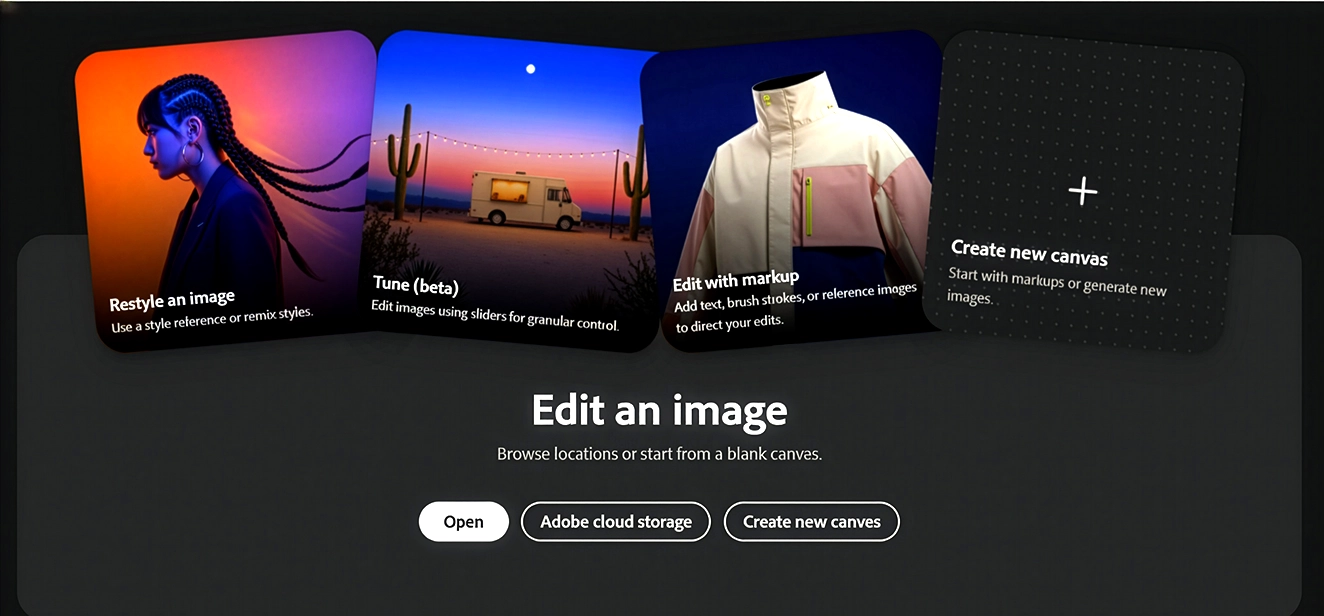
Unleashing Creativity with AI: Photoshop Generative Fill & Google Nano Adobe Photoshop update as of 6th January 2026 Something quite interesting just caught our attention the fact that you can now use Adobe Photoshop directly in Chatpgpt. Yes I know, we didn’t believe it either but apparently as of December 2025 you can and according to Adobe this is how you do it. Try out Photoshop and Chatgpt There’s also quite an interesting article about Adobe and Chatgpt over at...
